
Settings — Matter Type Defaults
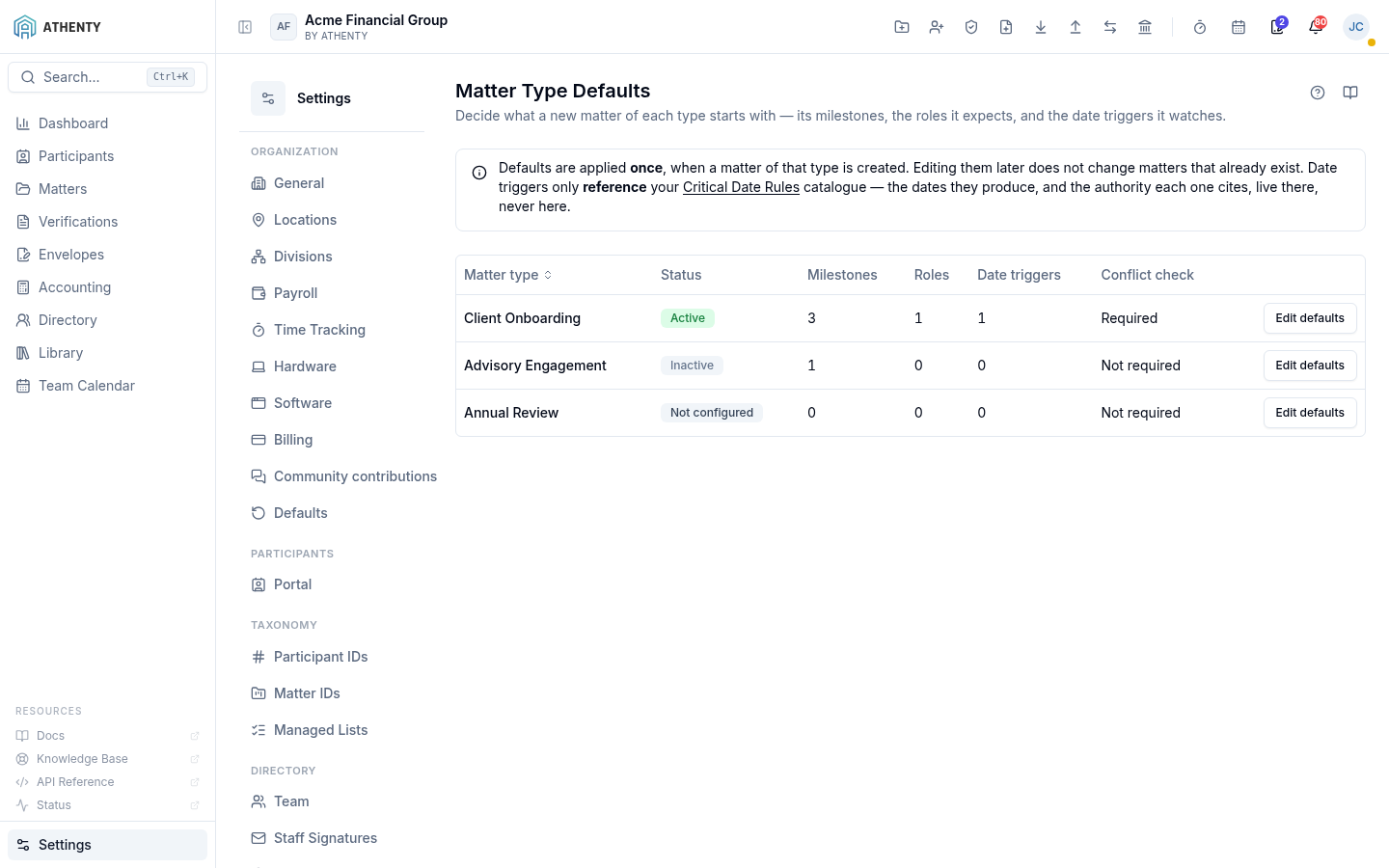
Settings ▸ Matters ▸ Matter Type Defaults is where a firm decides what a new matter of each type begins with. Athenty ships no defaults of its own: the milestones, roles and triggers on this page are entirely the firm’s own, and a type with nothing declared simply creates plain matters.
Anatomy of the page
Section titled “Anatomy of the page”1. Page header
Section titled “1. Page header”PageHeader with the title Matter Type Defaults, a one-line description,
the help drawer and a link to this page.
2. Scope notice
Section titled “2. Scope notice”A short alert restating the two rules that govern everything below: defaults are applied once at creation and never retro-fit existing matters, and date triggers only reference the Critical Date Rules catalogue.
3. The matter type table
Section titled “3. The matter type table”One row per non-archived matter type, in the order set on Settings ▸ Managed Lists. Columns:
| Column | Shows |
|---|---|
| Matter type | The type’s label from the matter_type managed list |
| Status | Active, Inactive, or Not configured (no declaration authored yet) |
| Milestones | How many milestones the type declares |
| Roles | How many participant roles it expects |
| Date triggers | How many triggers it watches |
| Conflict check | Required or Not required — stated as a word, never a colour or a tick alone |
| — | Edit defaults, which opens the editor |
A declaration whose matter type has since been archived or deleted is dropped from the table rather than rendered without a name.
Editing a type’s defaults
Section titled “Editing a type’s defaults”Edit defaults opens a side sheet with four sections.
- Milestones — name a milestone and add it; reorder with the up/down controls and remove with the bin. Each row shows a fixed identifier beneath its name. Up to 50.
- Participant roles — pick roles from the firm’s own Matter Roles list and mark each Required or not. Up to 30.
- Date triggers — choose a rule set to filter the catalogue, then tick the triggers this type should watch. Up to 50.
- Options — the conflict-check flag and the master Apply these defaults to new matters switch.
Save defaults writes the whole declaration; Cancel discards it.
Three rules worth knowing
Section titled “Three rules worth knowing”Applied once, never retro-fitted
Section titled “Applied once, never retro-fitted”A matter is scaffolded from its type’s defaults at the moment it is created and then owns those values outright. Editing the type afterwards changes what future matters start with and leaves every existing matter alone.
The identifier is frozen
Section titled “The identifier is frozen”Each milestone carries an identifier derived from the name it was first given. Renaming the milestone does not change it. That identifier is what makes re-applying a type’s defaults safe — without it, a re-application would add a second copy of the same milestone.
No day counts live here
Section titled “No day counts live here”A matter type default records which triggers a type watches, never how many days anything takes. Deadline arithmetic — and the citation and authority link that must accompany it — belongs to the Critical Date Rules catalogue. A number entered on a settings screen would carry no citation and would then appear on a matter looking exactly like a cited date.
Roles and scope
Section titled “Roles and scope”| Question | Answer |
|---|---|
| Who can see this page? | Owner and Admin |
| Who can save changes? | Owner and Admin |
| Add-on required? | Matter Planner. Without it the nav item is hidden and the API refuses with 402 |
| Scope | Per organization — declarations never cross tenants |
Troubleshooting
Section titled “Troubleshooting”| Symptom | Cause | Fix |
|---|---|---|
| The page is missing from Settings ▸ Matters | The org has no Matter Planner add-on | Enable it under Settings ▸ Billing, or contact your account owner |
| ”No matter types yet” | The matter_type managed list is empty | Add matter types under Settings ▸ Managed Lists, then return here |
| A type shows Not configured | Nobody has authored defaults for it | Open Edit defaults and save — a type with no declaration still creates matters normally |
| A saved milestone did not appear on an existing matter | Defaults apply at creation only | Add the milestone on that matter directly; the type’s defaults are not retro-fitted |
| The Add role button is disabled | The Matter Roles list is empty, or the 30-role cap is reached | Add roles under Settings ▸ Managed Lists, or remove one here |
| No triggers are listed | The selected rule set has no catalogue entries | Choose another rule set, or review Settings ▸ Critical Date Rules |
| A type is set Inactive | Its Apply these defaults to new matters switch is off | Turn it back on — nothing was deleted, and existing matters were never affected |